Create a User Account in Windows

Create a separate user account for each employee in Windows 10 lets each person adjust his or her individual profile settings. To create a new user account in Windows 10, follow these six steps.

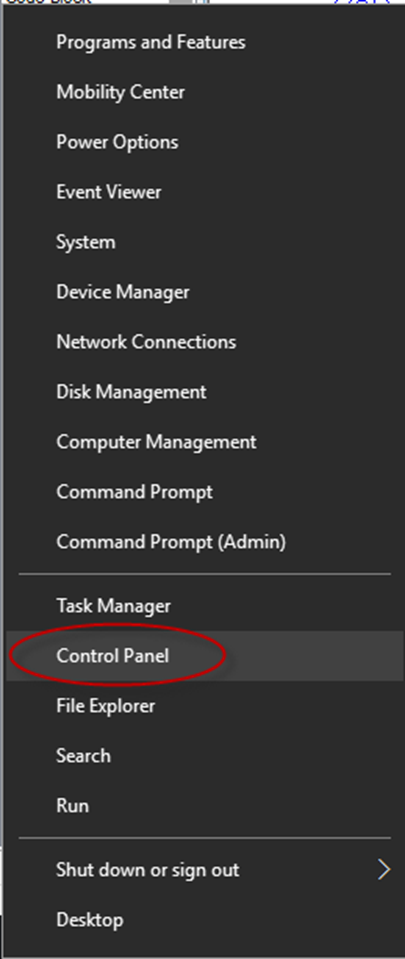
1. Right-click the Windows Start menu button

2. Select Control Panel

Create a User Account

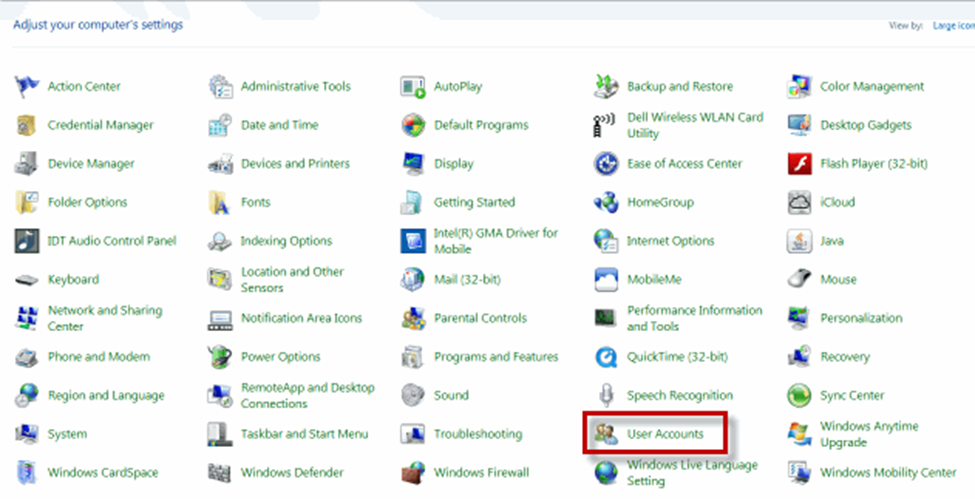
3. Select User Accounts

Create a User Account

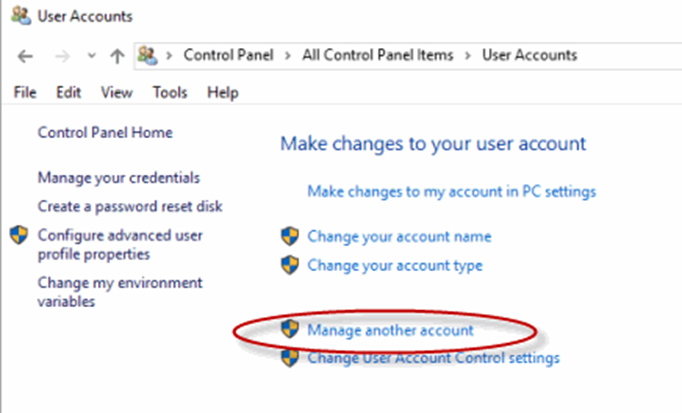
4. Select Manage another account

Create a User Account

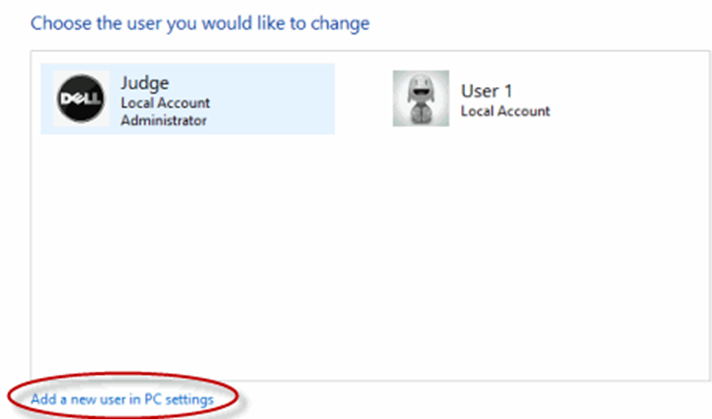
5. Select Add a new user in PC settings

Create a User Account

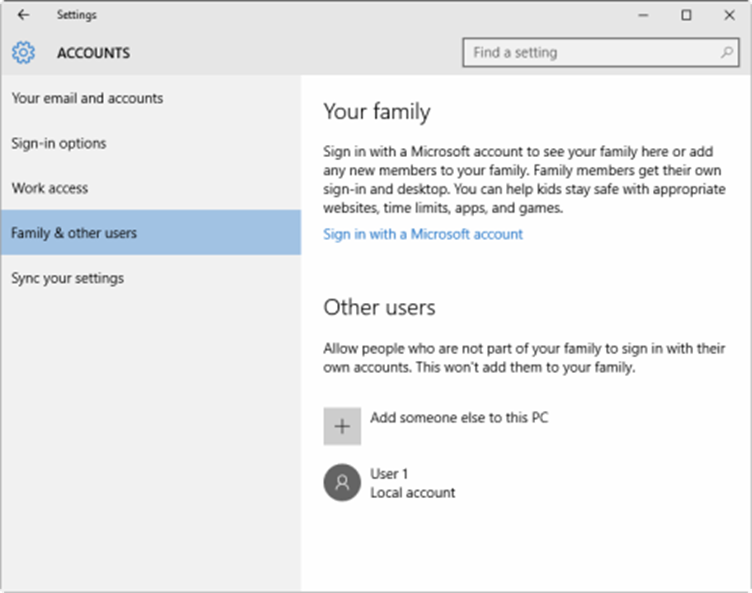
6. Use the Accounts dialog box to configure a new account

How to Clean Temporary and Junk Files from Windows

Comments

Popular posts from this blog

Upgrade Oracle Database 12c to 19c by DBUA Method

  Introduction Upgrade Oracle Database is a crucial step to ensure you're benefiting from the latest features, performance enhancements, and security updates. In this guide, we'll walk you through the process of upgrading your Oracle Database 12c to the latest version, 19c . Follow these steps to ensure a smooth and successful upgrade Environment Hostname : prod.infoinflux.com Database Name : PROD DB VERSION : 12.2.0.1.0 ORACLE_BASE : /u01/app/oracle DB Home Path : /u01/app/oracle/product/12.2.0.1/db_1 Datafile Location : /u01/app/oracle/oradata/PROD Target DB VERSION : 19.0.0.0 Target DB Path : /u01/app/oracle/product/19c/db_1 Upgrade Method : Database Upgrade Assistant Steps For upgrade using Database Upgrade Assistant (DBUA): Take Latest Database backup Make Directory for 19c Home Download and Unzip Software to 19c Home Directory Install 19c Binary or Software Create Pre and Post Upgrade Scripts Run Pre-Upgrade Script Pre-Upgra...

ORA-12012: error on auto execute of job SYS.ORA$AT_OS_OPT_SY_**

  Introduction ORA-12012 error is related to Oracle Database and is part of the Oracle Job Scheduler (DBMS_SCHEDULER) . It usually occurs when an automatic task or job execution encounters an issue. The error message you're seeing, " ORA$AT_OS_OPT_SY_<number> ," is specific to the job causing the problem. During the 12c database creation process, you can see ORA-12012 error in the alert log file when the “ SYS.ORA$AT_OS_OPT_SY_ ” auto job runs. To fix the error, it is necessary to drop the job and recreate it. Errors will be as follows. Errors in file /u01/app/oracle/diag/rdbms/prod/PROD/trace/PROD_j000_14524.trc: ORA-12012: error on auto execute of job "SYS"."ORA$AT_OS_OPT_SY_767" ORA-20001: Statistics Advisor: Invalid task name for the current user ORA-06512: at "SYS.DBMS_STATS", line 47207 ORA-06512: at "SYS.DBMS_STATS_ADVISOR", line 882 ORA-06512: at "SYS.DBMS_STATS_INTERNAL", line 20059 ORA-065...

Install Oracle Database 12.2(12c) on Linux

  Introduction Installing Oracle Database 12.2 on Linux system might seem daunting at first, but with the right guidance, it can be a smooth process. In this guide, we'll take you through the step-by-step procedure to install Oracle Database on a Linux environment. By the end of this tutorial, you'll have a functional Oracle Database instance up and running. Steps for Installation: 1. Prerequisites Automatic Setup 2. Prerequisites Manual Setup 3. Install Oracle Database Binary (Software only) 4. Create Database by DBCA 1. Prerequisites Automatic Setup To perform all your prerequisite setup automatically, issue the following command or you can proceed with manual setup explained in 2nd point. [ root @ prod ] # yum install oracle - database - server - 12cR2 - preinstall - y 2. Prerequisites Manual Setup a) Download and Unzip the oracle 12.2 Setup Download or copy the oracle setup file to any location as per your requirement. In...